

Why Forge split in 2023, who maintains Forge and NeoForge now, which versions each supports, how many mods each has, and how to tell which one a modpack needs.
If you run a modded server, you have probably seen two installers that look almost the same: Forge and NeoForge. Installing the wrong one is one of the most common reasons a modpack refuses to start.
In this guide, we will cover why Forge split in 2023, who maintains each project now, which Minecraft versions each supports, how many mods each has, and how to tell which loader a modpack needs.
By the end of this guide, you will know which loader to install and how to avoid mixing them up.
What Happened in 2023
On July 12, 2023, the Forge community Discord was rebranded to NeoForged. Almost all of the Forge team joined the new project, with one exception: LexManos, Forge's long-time lead (source: NeoForged).
NeoForged's own posts name long-running disagreements between the team and the project's management as the main reason. Because many of Forge's core assets were owned by Lex's company, Forge LLC, the team forked the code under a new name instead of keeping the old one.
 Forge itself carried on with LexManos.
When They Stopped Being Compatible
At first, NeoForge for 1.20.1 stayed compatible with Forge, so Forge 1.20.1 mods ran on it.
That changed with NeoForge 20.2 for Minecraft 1.20.2, released on October 30, 2023. All code moved to the net.neoforged package and the mod ID became neoforge (source: NeoForge 20.2).
From 1.20.2 on, a Forge mod doesn't load on NeoForge and a NeoForge mod doesn't load on Forge. Many mod authors upload separate files for each loader, so always grab the right one.
NeoForge also stopped working on its 1.20.1 version. Its 2023 retrospective says effort on 1.20.1 is better spent on Forge (source: NeoForged). So for 1.20.1, use Forge.
Timeline
| Date | What happened |
|---|---|
| July 12, 2023 | NeoForged announced, most of the Forge team joins |
| 2023 | NeoForge for 1.20.1 released, still compatible with Forge mods |
| October 30, 2023 | NeoForge 20.2 for 1.20.2 breaks compatibility with Forge |
| 2024 | NeoForge 21.1 for 1.21.1 becomes the main modding version, with over 4,000 mods by the end of the year |
| December 9, 2025 | NeoForge 21.11 for 1.21.11, the last Minecraft release with a 1.x number |
| March 24, 2026 | NeoForge for 26.1, with four-part version numbers and Java 25 |
| November 2026 | Both have 26.3 builds: Forge 66.1.x and NeoForge 26.3.0.x |
Sources: NeoForged 2024 retrospective, NeoForge for 26.1, Forge downloads.
Who Maintains Each Today
Forge
Forge is still released and still free. It has builds for 26.3 (Forge 66.1.x), and it keeps updating 1.20.1, where the recommended build is 47.4.28. Its README says it requires the Java version Minecraft requires: Java 25 for 26.1 and newer (source: Forge on GitHub).
 NeoForge
 is run by the NeoForged community team. It ships 26.3 builds and still updates 1.21.1 and 26.1.2.
Its version numbers follow Minecraft. 21.1.x is for Minecraft 1.21.1. From 26.1 on, versions have four parts, like 26.3.0.101: the first three match Minecraft 26.3 and the last is the NeoForge build (source: NeoForge docs).
Which Minecraft Versions Each Supports
| Minecraft | Forge | NeoForge | Use |
|---|---|---|---|
| 1.20.1 | 47.x | 47.1.x, no longer worked on | Forge |
| 1.21.1 | 52.x | 21.1.x | NeoForge for most packs |
| 26.1.2 | 64.x | 26.1.2.x | NeoForge for most packs |
| 26.3 | 66.x | 26.3.0.x | Check your mod list |
Mod Availability
We counted mods on Modrinth that have a build for each loader and Minecraft version in early November 2026.
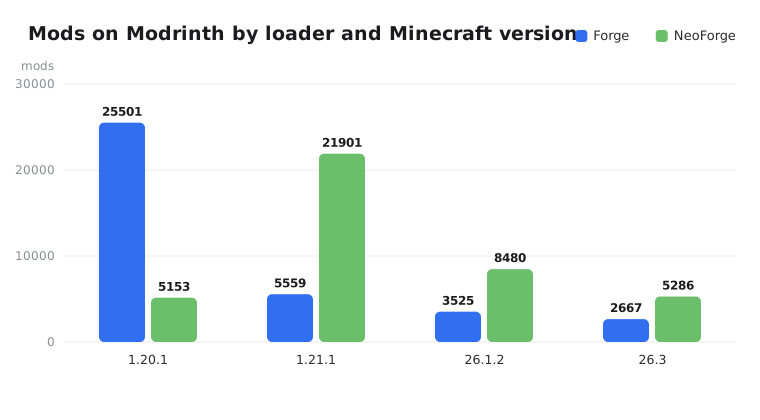
- 1.20.1 → Forge's home. Over 25,000 Forge mods. About 4,700 of the 5,153 NeoForge mods there are tagged for Forge too.
- 1.21.1 → NeoForge leads with about 21,900 mods against about 5,600 for Forge.
- 26.x → NeoForge has roughly twice as many mods as Forge, and Fabric has more than both (over 9,000 for 26.3).
Modpacks show the same picture. On Modrinth, 1.20.1 has 3,066 Forge modpacks and 263 for NeoForge, while 1.21.1 has 2,259 NeoForge modpacks and only 24 for Forge.
CurseForge has its own large catalog and a loader filter on every mod page, so check there too before you decide.
How to Tell Which Loader a Modpack Needs
- Check the modpack page. CurseForge and Modrinth show the loader and the Minecraft version.
- Look inside the pack file. A CurseForge pack lists the loader under
modLoadersinmanifest.json. A Modrinth.mrpacklists it inmodrinth.index.json, using the keysforge,neoforge,fabric-loaderorquilt-loader. - Read the loader version. Forge versions don't start with the Minecraft version (47.4.28 is for 1.20.1, 52.1.21 for 1.21.1). NeoForge versions do (21.1.265 for 1.21.1, 26.3.0.101 for 26.3).
- Open a mod jar (it's a zip file).
META-INF/neoforge.mods.tomlmeans NeoForge,META-INF/mods.tomlmeans Forge or an early NeoForge mod,fabric.mod.jsonmeans Fabric, andquilt.mod.jsonmeans Quilt.
Example from a Modrinth pack:
"dependencies": {
  "minecraft": "1.21.1",
  "neoforge": "21.1.265"
}
This pack needs NeoForge 21.1.265 on Minecraft 1.21.1. Install that exact version, not just "the latest".
Common mistakes
- Installing Forge for a NeoForge pack (or the reverse). The server crashes or lists mods it can't load.
- Downloading the wrong file from a mod page that offers both loaders.
- Updating the loader past the version the pack was built for.
Practical Advice
- Running a modpack → install exactly the loader and version it lists.
- Building your own pack on 1.20.1 → Forge.
- Building your own pack on 1.21.1 → NeoForge in most cases.
- Building on 26.x → check that your must-have mods exist first. NeoForge has more than Forge, and Fabric has the most.
- Moving a world between Forge and NeoForge → don't expect the mods to carry over. Take a backup.
Installing the server
Both installers use the same flag:
java -jar neoforge-26.3.0.101-installer.jar --installServerThe installer creates run.sh and run.bat to start the server, and user_jvm_args.txt where you set the RAM (source: NeoForge docs). Accept the EULA in eula.txt after the first start.
On EternalZero, the Versions Changer installs either loader in one click, the Mods and Plugins tab searches Modrinth and CurseForge, and the Startup tab sets the Java version (Java 25 for 26.x). For a full walkthrough, read How to Install Mods and Modpacks, and check How Much RAM Does a Minecraft Server Need? before you pick a plan.
Wrapping Up
If a modpack names its loader, use that loader and that exact version. That rule alone prevents most problems.
For your own packs, use Forge on 1.20.1 and NeoForge on 1.21.1 and newer, unless your favourite mods are only on Fabric. For a broader look at loaders, read Vanilla, Paper, Fabric or Forge.