

Plugins or mods? Compare Vanilla, Paper, Fabric and Forge: what each adds, what players must install, performance, hybrids like Mohist, and which to pick.
Once you know you want a Java server, the next question is which server software to run. Vanilla, Paper, Fabric and Forge are the four names you will see everywhere, and each one leads to a very different server.
In this guide, we will cover the difference between plugins and mods, what each software is good at, what your players need to install, performance, whether you can mix plugins and mods, and where NeoForge fits in.
By the end of this guide, you will know which one to pick for your server and why.
Plugins vs Mods: The Big Difference
Everything else in this article follows from this.
- Plugins run only on the server. They use the Bukkit, Spigot and Paper API to add commands, permissions, land claims, economy and minigames. Players join with a normal, unmodded client.
- Mods change the game code itself. They can add new blocks, mobs, dimensions and machines. When a mod adds content, every player needs the same mod installed.
The short version:
- Vanilla → no plugins, no mods (datapacks work)
- Paper → plugins only
- Fabric → Fabric mods only
- Forge → Forge mods only
 Vanilla
 is the official server jar from Mojang (minecraft.net). It runs the game exactly as Mojang made it.
You can't add plugins or mods, but datapacks work, so small crafting tweaks and custom features are still possible.
Best for: small groups of friends, technical players who need exact vanilla redstone, and playing a new release on day one.
Downside: no performance improvements, and no admin tools beyond the built-in commands.
 Paper
Paper is the usual choice for plugin servers. It grew out of Spigot and has been a hard fork since 1.21.4. PaperMC lists optimizations such as async chunk loading and faster light engine, hoppers and entities (source: PaperMC).
Most Bukkit and Spigot plugins run on Paper, along with plugins that use Paper's own API. Players join with a normal client.
Paper fixes some vanilla bugs, such as TNT, carpet and rail duplication. Technical players can turn several back on in config/paper-global.yml, but Paper's own docs say a 100% vanilla experience isn't possible (source: Paper docs).
unsupported-settings:
  allow-piston-duplication: true
  allow-headless-pistons: true
  allow-permanent-block-break-exploits: true
Note: These paths are for Paper 26.3. PaperMC plans to merge the Bukkit, Spigot and Paper config files in 26.4, so check the docs after you update.
Best for: survival with friends, public servers, minigames, and anything that needs protection, permissions or an economy.
Purpur and Folia are built on Paper. See Paper vs Purpur vs Folia if you are curious.
 Fabric
 is a lightweight, modular mod loader (fabricmc.net). Most Fabric mods also need Fabric API in the mods folder.
Fabric moves fast. It already supports Minecraft 26.3 and lists 26.4 snapshots, so it is often the first loader on a new version.
Fabric mods for servers come in two kinds:
- Server-side mods, like Lithium (game logic optimization) or Chunky (world pre-generation). Lithium's page says it can be installed on a server without players needing it, and it aims to keep vanilla mechanics unchanged. Players join with a normal client.
- Content mods that add blocks, items or mobs. Players need Fabric and the same mods.
Best for: vanilla-style servers that want better performance, lighter modpacks, and new versions early.
Quilt is a Fabric-compatible loader. See Fabric vs Quilt.
 Forge (and NeoForge)
Forge is the oldest of the big mod loaders and the home of many large content mods and modpacks. Modrinth still lists over 25,000 Forge mods for 1.20.1, and Forge also has builds for 26.3.
 In 2023, most of the Forge team left and created NeoForge. Since Minecraft 1.20.2 their mods aren't interchangeable, and for 1.21.1 and newer most big mods are on NeoForge. Read Forge vs NeoForge for the details.
Players need Forge (or NeoForge) and the same mods in the same versions. Modpacks make this easy: everyone installs the same pack in their launcher.
Best for: big content modpacks, tech and magic mods, adventure packs.
What Players Need to Install
| Software | Players need | Add-ons go in |
|---|---|---|
| Vanilla | Nothing | The world's datapacks folder |
| Paper | Nothing | plugins |
| Fabric | Nothing for server-side mods, Fabric and the same mods for content mods | mods |
| Forge / NeoForge | The same loader and the same mods | mods |
Tip: Players must also match the server's Minecraft version. On Paper, the ViaVersion plugin lets newer clients join an older server.
Performance
For plain survival, Paper or Fabric with Lithium are both good picks. Vanilla gives you no extra optimizations.
Mods add work for the server. Our 2026 server setup guide gives rough starting points: about 4 GB of RAM or more for Fabric, 6 GB or more for Forge, and the pack's own recommendation for modpacks.
CPU single-core speed still matters more than RAM. If your server lags, read How to Fix Minecraft Server Lag.
Mixing Plugins and Mods (Hybrids)
Hybrid server software can run plugins and mods together, but think twice before you use it.
 Mohist → Forge with Bukkit and Spigot plugins. Its newest builds are for 1.20.1 and 1.20.2. The same team's Youer does the same on NeoForge with the Paper API, with builds for 1.21.1 and 26.2.
- Arclight → Bukkit plugins on Forge, NeoForge or Fabric. Its latest stable release is for 1.21.1, and its experimental 1.21.11 and 26.1.2 builds dropped Forge (source: Arclight releases).
The risks:
- Hybrids lag behind new Minecraft versions.
- Plugins expect Paper's behavior while mods change the same code, so things can break in ways neither side supports. Velocity's docs, for example, list Forge-Bukkit hybrids as unsupported.
- Fixing problems is harder, because you are running two systems that weren't built to work together.
Often the better answer is a mod that does the plugin's job. Chunky, for example, has builds for Paper, Fabric, Forge and NeoForge.
Side-by-Side Comparison
| Software | Adds | Players install | Best for |
|---|---|---|---|
| Vanilla | Datapacks | Nothing | Pure vanilla, redstone |
| Paper | Plugins | Nothing | Survival, public servers, minigames |
| Fabric | Mods | Only for content mods | Performance, new versions, light packs |
| Forge | Mods | Forge and the mods | Big modpacks, 1.20.1 |
| NeoForge | Mods | NeoForge and the mods | Modpacks on 1.21.1 and newer |
The chart shows the size of each ecosystem on the newest version: projects on Modrinth that already had a 26.3 build in early November 2026.
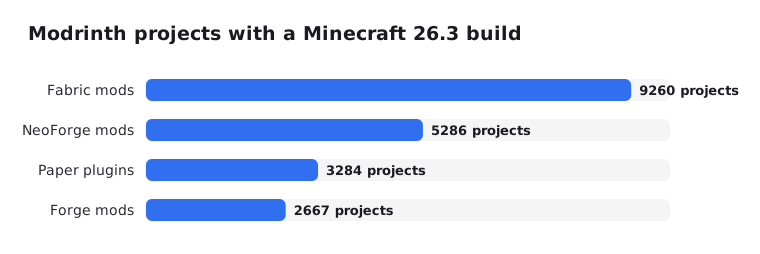
It only counts Modrinth. CurseForge, Hangar and SpigotMC have their own catalogs on top, and older versions like 1.20.1 and 1.21.1 still have far more mods.
Which One to Choose
- Small vanilla server with friends → Vanilla, or Fabric with Lithium for better performance.
- Survival with land claims, homes and ranks → Paper. See Essential Plugins for a New Minecraft Server.
- Technical redstone server → Vanilla, or Fabric with server-side mods only.
- Modpack → whatever loader the pack lists. Usually Forge for 1.20.1, NeoForge for 1.21.1 and newer, or Fabric.
- Plugins and mods together → avoid it if you can. If you must, test a hybrid on a copy of the world first.
On EternalZero you can switch software in the Versions Changer with one click. Take a backup first: plugins don't load on Fabric and mods don't load on Paper, so switching isn't a free undo.
To add plugins or mods, follow How to Install Plugins or How to Install Mods and Modpacks.
Wrapping Up
If you aren't sure yet, start with Paper. It is fast, players join with a normal client, and plugins cover most of what a new server needs.
Choose Fabric when you want vanilla with better performance, and NeoForge or Forge when you want a real modpack. You can always change later, just take a backup before you do.