

TPS and MSPT explained, how to tell server lag from FPS and ping, finding the cause with spark, and the exact settings that fix the usual culprits.
"The server is lagging" can mean three different problems: the server cannot keep up, a player's PC has low FPS, or the connection is slow. Each one has a different fix, so the first job is finding out which one you have.
In this guide, we will cover what TPS and MSPT mean, how to tell server lag from FPS and ping problems, how to find the cause with spark, the most common causes and the exact settings that fix them.
By the end of this guide, you will know how to measure your server's performance, find what is slowing it down and fix it without guessing.
TPS and MSPT in Plain Words
A Minecraft server runs the game in steps called ticks, 20 times per second. That gives each tick a budget of 50 milliseconds. MSPT (milliseconds per tick) is how long the server actually needs for one tick.
- MSPT under 50 → the server holds 20 TPS (ticks per second) and everything runs at normal speed.
- MSPT over 50 → TPS drops and the whole world runs in slow motion.
The Minecraft Wiki puts it simply: TPS can stay at 20 "only if the MSPT is no higher than 50" (source: Minecraft Wiki).
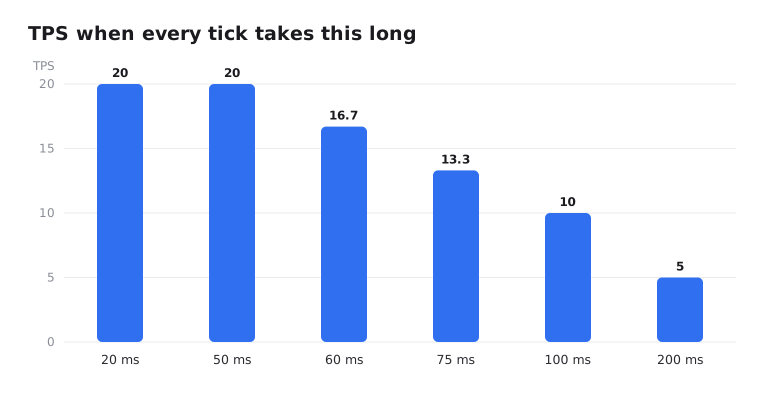
On Paper, check both with /spark tps. Paper also has /tps and /mspt, but its docs say spark has replaced them (source: Paper docs).
Tip: Watch MSPT, not just TPS. A server at 20 TPS with 45 MSPT looks fine, but it is one big farm away from lagging.
Server Lag, Low FPS or High Ping
| Problem | What you see | Who is affected | Where to look |
|---|---|---|---|
| Server lag (low TPS) | Broken blocks reappear, mobs freeze then jump, crops and furnaces slow down | Everyone at once | TPS and MSPT, spark |
| Low FPS | Choppy screen, but the world runs at normal speed | One player | Their PC: render distance, graphics settings, performance mods |
| High ping | Rubber-banding, delayed hits, mostly for one player | Players far away or on bad connections | Ping in the player list, server location |
If TPS is a steady 20 and only one player complains, the problem is on their side. Low FPS is fixed on the client, for example with lower render distance or a client mod like Sodium. Never put client mods on the server.
Find the Cause with spark
spark is a profiler that shows exactly what the server spends its time on. It is built into Paper since 1.21. On Fabric, Forge or NeoForge, install the spark mod.
/spark profiler start --timeout 300This records for 5 minutes, then gives you a link to a report. Run it while the lag is happening. You can also use /spark profiler start and then /spark profiler stop when you have seen enough.
For short lag spikes, only record the slow ticks:
/spark profiler start --only-ticks-over 100In the report, open the server thread and follow the biggest percentages down. You are looking for a name you recognise: a plugin, entity ticking, chunk generation or a block like hoppers. If a plugin is at the top, send the report to its developer.
Paper also has two handy commands:
/paper entity listlists the entities that are ticking, so you can spot that farm with 2,000 chickens./paper chunkinfoshows how many chunks are loaded in each world.
The Most Common Causes
Too many entities
Mob farms, piles of dropped items, villager trading halls, armor stands, minecarts and boats. Every entity costs time on every tick.
Chunk generation
Generating new terrain is one of the heaviest jobs a server does. Players flying with elytra or exploring in different directions can drop TPS fast.
Redstone and hoppers
Fast redstone clocks and long hopper chains run all the time, even when nobody is looking at them.
View and simulation distance
Higher distances mean more chunks loaded and more chunks ticking around every player.
Plugins and mods
One badly written plugin can use most of the tick. spark will name it, so don't guess and remove plugins at random.
Fixes with Exact Settings
Take a backup before changing configs, change one thing at a time, and restart after each change.
server.properties
Both distances default to 10. Lowering them is the biggest single fix on most servers. These values are a common choice, not a rule:
view-distance=8
simulation-distance=6
view-distance is how far chunks are sent to players. simulation-distance is how far around players mobs, crops and redstone actually run. Our server.properties guide covers both. On EternalZero, the Properties Editor explains each setting before you change it.
spigot.yml (Paper and Purpur)
Under world-settings.default:
entity-activation-range: how close a player must be for entities to run their full AI. Defaults: animals 32, monsters 32, raiders 64, misc 16, water 16, villagers 32. Lowering them a little saves time.merge-radius.item: default 0.5. A slightly higher value merges dropped items into fewer stacks.nerf-spawner-mobs: true: removes most AI from spawner mobs, which helps spawner farms.
paper-world-defaults.yml (in the config folder)
collisions:
  max-entity-collisions: 2           # default 8
environment:
  optimize-explosions: true          # default false
hopper:
  ignore-occluding-blocks: true      # default false
misc:
  redstone-implementation: ALTERNATE_CURRENT   # default VANILLA
update-pathfinding-on-block-update: false # default trueALTERNATE_CURRENTcan reduce redstone lag, but it changes how redstone dust behaves, so test your contraptions.hopper.disable-move-event: truealso helps hopper-heavy worlds, but it breaks any plugin that relies on hopper move events, so only use it if you know none of yours do.entities.armor-stands.tick: falsestops decorative armor stands from ticking.
Option names come from Paper's world configuration and spigot.yml references.
Purpur extras
Purpur can "lobotomize" villagers that cannot move, which removes their AI but keeps trading. It is great for trading halls. In purpur.yml:
world-settings:
  default:
    mobs:
      villager:
        lobotomize:
          enabled: true   # default false
Fabric servers
Fabric does not have Paper's performance settings, so use performance mods instead: Lithium (game logic), FerriteCore (memory) and C2ME (chunk performance). Check each mod's page for supported versions.
Pre-Generate Your World
Since generating chunks is so heavy, do it ahead of time. Pick a radius (ideally the same as your world border), then let the Chunky plugin generate everything inside it while nobody is playing:
/chunky radius 5000
/chunky start
Our Chunky pre-generation guide walks through the full process.
When the Problem Is the Hardware
If spark shows no single cause, the world is small and you have few plugins, but MSPT is still high, the CPU is too slow. Minecraft's main thread depends on single-core speed, so more RAM will not help.
Check memory too. Long garbage collection pauses look like lag spikes. Our RAM guide shows how to tell if memory is the problem. If you need a faster machine, our free vs paid hosting guide can help you decide.
Conclusion
Don't guess. Check TPS and MSPT first, run a spark profile while the lag is happening, and fix what it shows you.
For most servers, lower view and simulation distance, controlled farms and a pre-generated world solve the problem. Only change hardware once the settings are right.