

Typical RAM by server type and player count, why more is not always better, Aikar's flags, and how to measure real memory use with spark.
RAM is the first number you pick for a Minecraft server, and it is easy to get wrong in both directions. Too little and the server stutters or crashes. Too much and you pay for memory that does nothing.
In this guide, we will cover typical RAM amounts by server type and player count, why more RAM is not always better, what actually uses memory, Aikar's flags, and how to check your real usage with spark.
By the end of this guide, you will know how much RAM to start with and how to tell whether your server really needs more.
Typical Starting Points
There is no exact formula, because your world, plugins and settings change the answer. Use these numbers as a starting point, not a benchmark, then adjust based on what you measure.
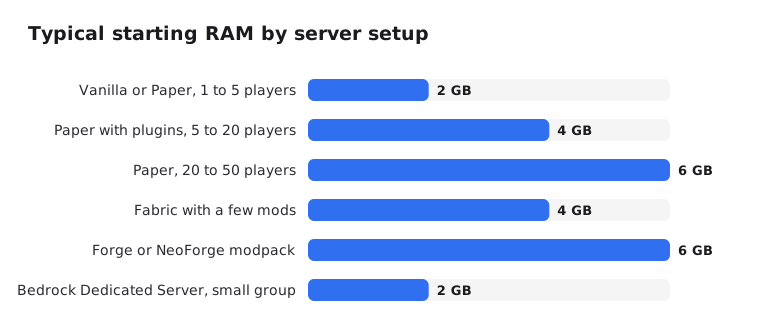
- Vanilla or Paper, 1 to 5 players: about 2 GB is enough for a small survival world.
- Paper with plugins, 5 to 20 players: start at 4 GB.
- Paper, 20 to 50 players: 6 GB, and keep an eye on farms and view distance.
- Fabric with a few mods: 4 GB.
- Forge or NeoForge modpack: 6 GB or more. For big packs, follow the RAM the pack page recommends.
- Bedrock Dedicated Server, small group: about 2 GB.
Example: for a Paper server with 10 friends and a handful of plugins, 4 GB is a sensible place to start. If spark shows plenty of free memory after a week, you can even go lower.
What Official Sources Say
Official numbers do not agree with each other, so it helps to see them side by side:
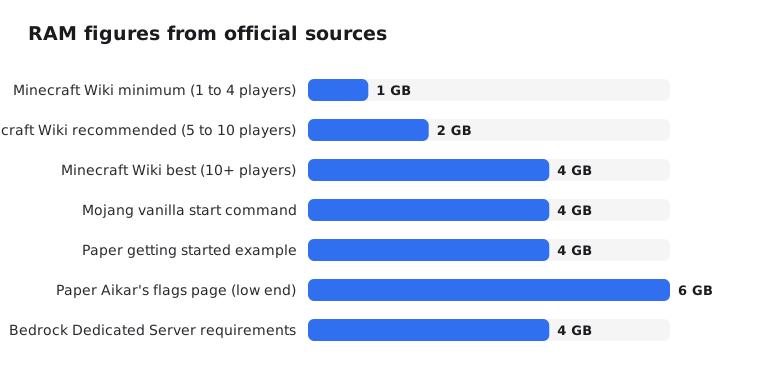
- The Minecraft Wiki lists 1 GB as the minimum for 1 to 4 players, 2 GB for 5 to 10 and 4 GB for 10 or more, for a fresh vanilla world.
- Mojang's server download page now shows a start command with
-Xmx4G -Xms4G. - Paper's getting started page uses 4 GB in its example, while its Aikar's flags page says "at least 6-10GB, no matter how few players".
- For Bedrock, the Bedrock Dedicated Server page lists 4 GB in its system requirements, but its FAQ says at least 1 GB for small servers.
The low numbers are what a fresh world can survive on. The higher numbers leave room for exploring, farms and plugins.
Why More RAM Is Not Always Better
RAM does not make ticks faster
Most of the game's work happens on one main thread. If that thread is too slow, your TPS drops no matter how much memory you add. The Minecraft Wiki recommends a CPU with good single-core performance for this reason.
If your server lags but memory is fine, the problem is CPU time. Our lag guide shows how to find what is using it.
Garbage collection
Java does not free memory the moment it stops being used. A garbage collector (GC) cleans it up from time to time. Extra RAM gives the GC more room, but past a point you get very little back. Paper's docs warn that going to 32 GB "will only waste your money with minimal returns".
Java needs memory outside the heap
-Xmx only sets the heap. Java also needs memory for itself and the system. Aikar's advice is to set -Xmx about 1000 to 1500 MB below the memory you actually have, so the process does not run the machine out of memory.
Example: on a machine or plan with 8 GB, use about -Xmx6500M, not -Xmx8G.
What Actually Uses Memory
- Loaded chunks: every player keeps a square of chunks loaded around them. With
view-distance=10that is a 21 by 21 square, about 441 chunks per player. Players spread across the map each load their own area. - Entities and block entities: mob farms, item drops, villagers, armor stands, hoppers and chests all take memory and CPU.
- Mods: every mod adds code and data. A big modpack can use several GB before anyone joins.
- Plugins: web map plugins, caches and big databases add up.
- World generation: exploring new land causes spikes. Pre-generating with Chunky moves that work to a time when nobody is online.
- Players: the Minecraft Wiki estimates 50 to 100 MB per player, not counting the chunks they load.
Lowering view-distance and simulation-distance is the quickest way to cut memory use. Our server.properties guide explains both.
Tip: On modded servers, try mods built to reduce memory use, like FerriteCore and ModernFix. Check that they support your loader and Minecraft version first.
Aikar's Flags and When to Use Them
Aikar's flags are a set of Java options that tune the G1 garbage collector for Minecraft. Paper's docs still recommend them, along with setting -Xms and -Xmx to the same value:
java -Xms6G -Xmx6G -XX:+UseG1GC -XX:+ParallelRefProcEnabled -XX:MaxGCPauseMillis=200 -XX:+UnlockExperimentalVMOptions -XX:+DisableExplicitGC -XX:+AlwaysPreTouch -XX:G1NewSizePercent=30 -XX:G1MaxNewSizePercent=40 -XX:G1HeapRegionSize=8M -XX:G1ReservePercent=20 -XX:G1HeapWastePercent=5 -XX:G1MixedGCCountTarget=4 -XX:InitiatingHeapOccupancyPercent=15 -XX:G1MixedGCLiveThresholdPercent=90 -XX:G1RSetUpdatingPauseTimePercent=5 -XX:SurvivorRatio=32 -XX:+PerfDisableSharedMem -XX:MaxTenuringThreshold=1 -Dusing.aikars.flags=https://mcflags.emc.gs -Daikars.new.flags=true -jar server.jar --noguiPaper's own start script generator gives slightly different advice: on modern Java (17, 21 or newer), "try with no flags first", and use Aikar's flags if you have GC problems or run an older Minecraft or Java version.
The two pages don't fully agree, so here is a practical approach: start without extra flags, watch GC with spark, and switch to Aikar's flags if you see long GC pauses. If you use more than 12 GB, Aikar's original post lists a few values to change.
On a host, the Java version and startup options usually live in the panel. On EternalZero, that is the Startup page.
How to Check How Much RAM You Really Use
The memory graph in a panel shows how much the whole Java process holds, not how much your world needs. Java keeps memory it has already taken, and with -Xms equal to -Xmx plus -XX:+AlwaysPreTouch (part of Aikar's flags) it claims the whole heap at startup. A graph near 90% is normal and not a reason to upgrade.
Use spark instead. It is built into Paper since 1.21, and there is a spark mod for Fabric, Forge and NeoForge.
/spark healthshows memory, CPU, TPS and MSPT./spark gcshows garbage collection history./spark gcmonitorreports each GC as it happens./spark heapsummaryshows what is taking up memory.
Signs you need more RAM
- Memory stays close to the maximum even right after a GC.
- GC runs very often, or with long pauses that match lag spikes.
- The log shows
java.lang.OutOfMemoryError: Java heap space.
Signs you don't
- Memory drops well below the limit after each GC.
- TPS is low but memory looks fine. That is a CPU or settings problem.
Conclusion
Start with a sensible amount for your setup: about 2 GB for a small vanilla or Paper server, 4 GB with plugins or light mods, and 6 GB or more for modpacks. Then measure with spark before you add more.
If you need more memory than your current plan gives, read our free vs paid hosting guide to decide on your next step.