

Stop exploration lag before it starts: set a world border, pre-generate your world with Chunky, handle the Nether and the End, and estimate time and disk space.
Your server runs fine with everyone at spawn. Then a few players grab elytra and fly off in different directions, and suddenly the whole server stutters, chunks load slowly and TPS drops.
That is chunk generation. Every time someone reaches land nobody has visited before, the server has to create it from scratch. Pre-generating your world does that work ahead of time. In this guide, we will cover why new chunks cause lag, setting a world border, the Chunky commands, the Nether and the End, how to estimate time and disk space, and using Chunky on Fabric and NeoForge.
By the end of this guide, you will know how to pre-generate a world of the right size before your players ever log in.
Why New Chunks Cause Lag
A chunk is a 16 by 16 block column of the world. When a player walks into a chunk that doesn't exist yet, the server has to build the terrain, caves, ores, structures and lighting, and then save it to disk.
One player exploring is usually fine. Several players exploring quickly at the same time can push the server past what it can generate per second, and everyone feels it, including players who are just standing at spawn.
A chunk that was already generated only has to be loaded from disk, which is far less work. Pre-generation means the heavy part happens once, before launch, instead of during play. The Chunky docs put it simply: most servers pre-generate "to avoid unnecessary lag loading chunks" (source).
It won't fix lag from big farms or too many entities. For that, read How to Fix Minecraft Server Lag.
Before You Start
- Take a backup. Pre-generation is safe, but trimming chunks later is not reversible. See How to Back Up and Restore Your Minecraft Server.
- Pick a size. Bigger is not always better. A radius of 5,000 blocks is a good first try according to the Chunky docs, and you can grow it later.
- Stop the server from pausing. Since 1.21.2, an empty server pauses after 60 seconds. The Chunky FAQ recommends setting
pause-when-empty-seconds=-1inserver.properties(then restart) so generation keeps running normally with nobody online. - Turn off map rendering. If you use Dynmap or BlueMap, pause its rendering while you generate and render once at the end.
- Install Chunky. Put the jar in
plugins/on Paper, or inmods/on Fabric, Forge and NeoForge. The Fabric version also needs Fabric API. Downloads: Modrinth.
Set a World Border First
Pre-generating 5,000 blocks is pointless if players can walk to 50,000. A world border keeps them inside the area you generated.
The vanilla /worldborder set command takes a diameter, not a radius. For a border 5,000 blocks out in every direction from 0, 0:
worldborder center 0 0
worldborder set 10000
Since Minecraft 1.21.9, each dimension has its own border, and the command only changes the dimension you run it in (source). From the console, use execute in for the other dimensions:
execute in minecraft:the_nether run worldborder center 0 0
execute in minecraft:the_nether run worldborder set 1250
Warning: make the border at least as big as the area you generate. Mobs don't spawn outside the world border, and the Chunky FAQ lists a border smaller than the generated radius as the usual cause of "no mobs after pre-generation".
Pre-Generating with Chunky, Step by Step
Run these in the console. In game, add a slash in front.
- Pick the world:
chunky world world - Copy the border's center and size:
chunky worldborder - Start:
chunky start
If you didn't set a border, choose the area yourself instead:
chunky center 0 0
chunky radius 5000
chunky start
Chunky's default selection is the overworld, a square, centered on 0, 0 with a 500 block radius, so always set the radius you actually want.
| Command | What it does |
|---|---|
chunky radius 5000 | Sets the radius in blocks. 5k also works, and +1k grows the current radius. |
chunky shape circle | Generates a circle instead of a square |
chunky progress | Shows progress in game |
chunky pause | Pauses and saves progress |
chunky continue | Carries on from where it paused |
chunky cancel | Stops and deletes the task. Generated chunks stay. |
Source: Chunky commands. While it runs, the console shows the chunks done, percent complete, an ETA and the rate in chunks per second.
A restart stops the task. Run chunky continue after the server comes back, or turn on continue-on-restart in Chunky's config.yml.
The Nether and the End
Each dimension is generated separately. Change the world and start again:
chunky world world_nether
chunky radius 625
chunky start
World names depend on your server software and version. The Nether is usually called world_nether or the_nether, and the End world_the_end or the_end. Type chunky world followed by a space and press Tab to see the names your server uses.
One block of travel in the Nether equals eight in the overworld (source). A Nether radius of one eighth of your overworld radius lines up with your overworld border, so portals built inside the border lead into generated land. Go bigger if your players like exploring the Nether itself.
The End is mostly empty void around floating islands. Generate a smaller radius there, or skip it and let players explore the outer islands as they go.
How Long It Takes and How Much Disk It Uses
We can't give you a number, because it depends on your CPU, your Minecraft version and your mods. You can estimate both yourself, though.
The key thing to know is that the work grows with the area, not the radius. Double the radius and you generate about four times as many chunks.
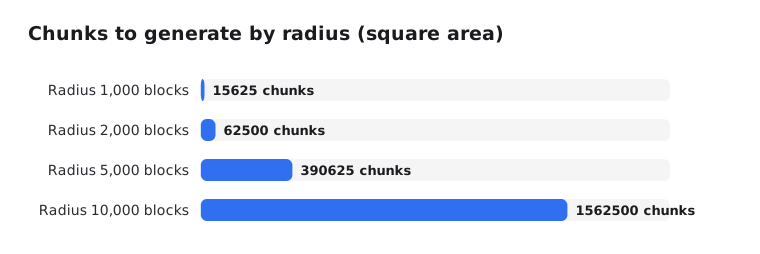
Time: start the task and watch the chunks per second in the console for a minute. Divide the total chunks by that rate for a rough time. Chunky also prints its own ETA.
Disk space: generate a small radius first, like 1,000 blocks, and check how big the region folders got. A radius of 5,000 has 25 times the area of 1,000, so multiply by 25 for a rough estimate. Chunky's FAQ also points to tgb's World Size Calculator for a quick guess. Check your plan's disk limit before going big.
Speed tips from the Chunky FAQ: a fast CPU and SSD matter most, at least 4 GB of RAM is recommended, and Paper's chunk improvements make generation faster. On Fabric, the FAQ suggests Lithium.
Chunky on Fabric, NeoForge and Forge
Chunky isn't only a plugin. The same commands work on these mod loaders:
 Fabric: put Chunky and Fabric API in
mods/ NeoForge: put Chunky in
mods/ Forge: put Chunky in
mods/
Modded worlds take longer to generate, since mods add biomes and structures. The Chunky FAQ lists a few mods known to cause crashes or stalls during generation, such as C2ME and Dimensional Threading. If generation crashes, test with those removed. For modpack setup, see How to Install Mods and Modpacks on a Minecraft Server.
Common Problems
- No mobs in the world: your world border is smaller than the radius you generated. Make the border bigger.
- Server crashes or freezes: try again with only Chunky installed, then add plugins and mods back one by one.
- Generated too much:
chunky trimdeletes chunks outside your selection. It can't be undone without a backup, and you need to restart afterwards. - Map plugin not updating: trigger a full re-render after generation finishes.
On EternalZero, you can run all of these from the server's Console, and the Properties Editor changes pause-when-empty-seconds without opening the file.
Wrapping Up
Start with a modest overworld radius, a matching world border and a smaller Nether. Generate before launch, check your disk usage, and grow the border later when players need more room.
Your players get smooth exploring from day one, and your server spends its power on them instead of on building terrain.