

When to update your Minecraft server and when to wait: the new 26.x version numbers, plugin and mod lag, safe backups, ViaVersion, and the versions modpacks use.
Every few months Mojang ships a new Minecraft update, and your players start asking when the server will have it. Updating on day one feels right, but it is also the fastest way to break your plugins, your mods or your world if you are not ready.
In this guide, we will cover how Minecraft versions are numbered now, how often updates come out, the real reasons to update right away or to wait, how to let players on other versions join anyway, and which versions modded servers usually stick to.
By the end of this guide, you will know when to update your server, how to do it safely, and when staying on an older version is the smarter choice.
How Minecraft Versions Work Now
If you have not followed Minecraft news for a while, the version numbers will look strange. There is no 1.22. Mojang announced a new system in December 2025, and 1.21.11 was the last version with the old "1." prefix (source: Minecraft Wiki, Version formats).
Java Edition versions now look like YY.D.H:
- YY → the year. 26 means 2026.
- D → the drop number in that year. 26.1 is the first drop of 2026.
- H → the hotfix. 26.1.2 is the second hotfix for 26.1. A fresh drop has no hotfix number.
Snapshots also carry the version they lead to, for example "26.4 Snapshot 7" instead of the old week-based names like "25w41a". Bedrock uses the same year prefix but its own numbers after it, so Bedrock is on 26.60 while Java is on 26.3. The two numbers do not line up.
How often updates come out
Mojang now releases smaller "game drops" a few times a year. The Java releases so far in 2026:
- 26.1 → March 24, 2026 (then hotfixes 26.1.1 and 26.1.2 in April)
- 26.2 → June 16, 2026
- 26.3 → September 15, 2026 (the current release)
- 26.4 → in snapshots now, listed for Q4 2026
So expect a new version roughly every three months. That is too often to rush every single one.
Reasons to Update Right Away
- Your players want the new content. New mobs, blocks and biomes are the main reason people come back.
- Paper only supports the newest version. PaperMC's download API marks 26.3 as supported. 26.2 was marked unsupported on November 3, 2026, and older versions get no bug fixes.
- Geyser follows the latest Java version. It currently targets Java 26.3. Older servers need ViaVersion for Bedrock players to join.
- Plain vanilla servers have little to lose. No plugins or mods means nothing to wait for. Back up and update.
Reasons to Wait
Your server software needs time
Paper usually publishes experimental builds on release day, but they are marked alpha or beta for a reason. Here is how long it took to get the first build marked stable for recent versions:
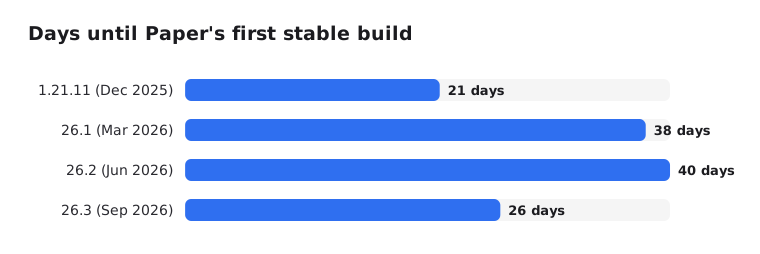
That is three to six weeks of waiting for a stable Paper build, and your plugins then need their own updates on top.
Plugins and mods lag behind
Every plugin and mod author has to update their work for each version, and many do it in their free time. Big mod loaders are quick (NeoForge already has builds for 26.3), but content mods can take months or skip versions entirely. Create, one of the most popular mods, still lists only 1.18.2, 1.19.2, 1.20.1 and 1.21.1 on Modrinth in November 2026.
The Java requirement can change
26.1 raised the minimum to Java 25. If your server or host was still on Java 21, the new version will not even start. Read Which Java Version Does Your Minecraft Server Need? before you update across a big jump.
A world upgrade is one way
When a newer version opens your world, it converts the chunks to the new format. You cannot simply go back. Minecraft itself warns that loading a world in an older version may corrupt it. That is why the backup step below is not optional.
How to Update Safely
- Check your plugins or mods. Look at each one's page on Modrinth, Hangar or CurseForge and confirm it lists the new version.
- Stop the server and make a full backup. Worlds, configs and the
pluginsormodsfolder. PaperMC calls backups "the most important step, and yet the most frequently skipped" (source: PaperMC docs). - Update Java if needed, then swap the server jar.
- Start the server and read the console. Plugin errors show up during startup.
- Test in game before you announce the update.
On EternalZero, this is a few clicks: make a backup in the Backups tab (lock it so it cannot be deleted by accident), then pick the new version in the Versions Changer. If something breaks, restore the backup. Our backup guide covers this in detail.
Tip: Copy your server to a test server first if you can. Updating a copy costs nothing, and you find the broken plugin before your players do.
Let Players on Other Versions Join
You do not have to force everyone onto the same version as your server. The Via plugins translate between client versions on Paper and Velocity:
| Players joining with | Install |
|---|---|
| A newer version than the server | ViaVersion |
| An older version, down to 1.9 | ViaVersion + ViaBackwards |
| 1.7.x or 1.8.x | ViaVersion + ViaBackwards + ViaRewind |
(source: ViaVersion on GitHub)
This gives you a nice middle ground. Stay on the version your plugins support, add ViaVersion, and players with the newest client can still join. They just will not see the newest blocks and mobs until the server updates. ViaVersion itself is usually released a few days after a Minecraft update, so it lags a little too.
On a network, install the Via plugins on the Velocity proxy or on the backends. Read our Velocity guide for how networks are put together.
Which Versions Modded Servers Stick To
Modded Minecraft does not move with every release. The community gathers around a few versions where the big mods and modpacks live:
| Version | Loader | Examples | Java |
|---|---|---|---|
| 1.21.1 |  NeoForge | All the Mods 10, Create | 21 |
| 1.20.1 |  Forge | All the Mods 9, Create | 17 |
| 26.1.2 | NeoForge | All the Mods 11 (beta in November 2026) | 25 |
| 1.12.2 | Forge | RLCraft and many older classic packs | 8 |
The rule for modpacks is simple: run the exact Minecraft and loader version the pack was built for. Never update Minecraft under a modpack. Wait for the pack author to release a new version. Read our mods and modpacks guide for the setup.
A Simple Decision Guide
- Vanilla server with friends → update within a few days of the release, after a backup.
- Paper with plugins → wait for a stable Paper build and for your must-have plugins to support it. Use ViaVersion in the meantime.
- Modded or modpack server → stay on the pack's version. Update only when the pack does.
- Velocity network → update the proxy first (it supports many client versions at once), then move backends one by one.
- Bedrock server (BDS) → update right away. Bedrock clients update themselves, and an outdated server turns them away.
- Java server with Geyser → keep Geyser updated even if the server stays on an older version, and add ViaVersion.
Still choosing your server software? Read What's the Best Minecraft Version for Your Server?
Conclusion
You do not need to run the newest Minecraft release on day one. For a plugin server, waiting a few weeks for stable builds and plugin updates saves you a lot of trouble, and ViaVersion lets new clients join in the meantime.
When you do update, back up first, check your Java version, and test before you announce it. Vanilla and Bedrock servers can update quickly. Modded servers should follow their modpack, not Mojang's calendar.